


Chat is where most of your time with your companion happens. Two settings shape every reply: the chat tier (how deep the replies are) and the chat mode (how they're written).
Quick answer
Free users chat in Roleplay mode on the Crush tier (1 per message). Subscribers get unlimited chat on Crush or Devotion, and can switch between Roleplay and Text any time from Companion Panel → Chat Settings. Use Devotion + Roleplay for immersive scenes; Crush + Text for quick texting energy.
Chat tiers: Crush and Devotion
| Tier | Crush | Devotion |
|---|---|---|
| Replies | Quick, everyday | Deeper, longer, more immersive |
| Best for | Casual chat, fast back-and-forth | Detailed roleplay, emotional scenes |
| Free plan | 1 a message | — |
| Subscribers | Free, unlimited | Free, unlimited |
Same message, two tiers
You: "Rough day at work."
Crush: She looks up from her book and pats the cushion next to her. "Ugh, come here. Tell me everything. What happened?"
Devotion: She sets her phone down and gives you her full attention. "Come here. Start at the beginning, I want to hear all of it, and don't skip the part where you wanted to scream."
Crush is a spark. Devotion stays with the moment. In Roleplay mode, a typical Crush reply runs about 200 words and a typical Devotion reply about 300. More examples, and which to use when: Crush vs Devotion.
Chat modes: Roleplay and Text
In the app, the toggles are labelled Roleplay and Text under Chat Mode.
Roleplay Mode writes like a story. Your companion describes what they do, where you are and how the scene feels, along with what they say.
She sets her coffee down and glances up, a slow smile forming. "You're late. Again."
Text Mode reads like messages from your phone. Short, casual, no narration.
you're late again 🙄 lucky you're cute
Free users chat in Roleplay Mode. Subscribers can switch any time, mid-conversation, without losing context.
Same moment, two modes
You: "I'm outside your door."
Roleplay: A light flicks on in the hallway. She pulls the door open, hair still damp from the shower, surprise melting into a grin. "You didn't text that you were coming."
Text: wait you're HERE?? give me 2 sec 😭
Which combination for what
| Goal | Chat Mode | Chat Model | Why |
|---|---|---|---|
| Quick flirting | Text | Crush | Fast, playful, low ceremony |
| Daily check-ins | Text | Crush | Feels like a real text thread |
| Slow-burn story | Roleplay | Devotion | Room for mood and detail |
| Emotional scene | Roleplay | Devotion | Longer replies, richer narration |
| Action-heavy RP | Roleplay | Devotion | Scene beats and body language |
| Testing a new companion | Roleplay | Crush | Cheaper on free plan before you subscribe |
Cost by plan
| Free | Subscriber | |
|---|---|---|
| Crush messages | 1 each | Free, unlimited |
| Devotion messages | Not available | Free, unlimited |
| Roleplay mode | ✓ | ✓ |
| Text mode | — | ✓ |
See plans and coins for full pricing.
How to change tier and mode (subscribers)
- Tap Open companion panel (panel icon at the top of the chat).
- Open Chat Settings.
- Under Chat Mode, pick Roleplay or Text.
- Under Chat Model, pick Crush or Devotion.
- For scene direction, scroll to God Mode, type your note, and tap Save.
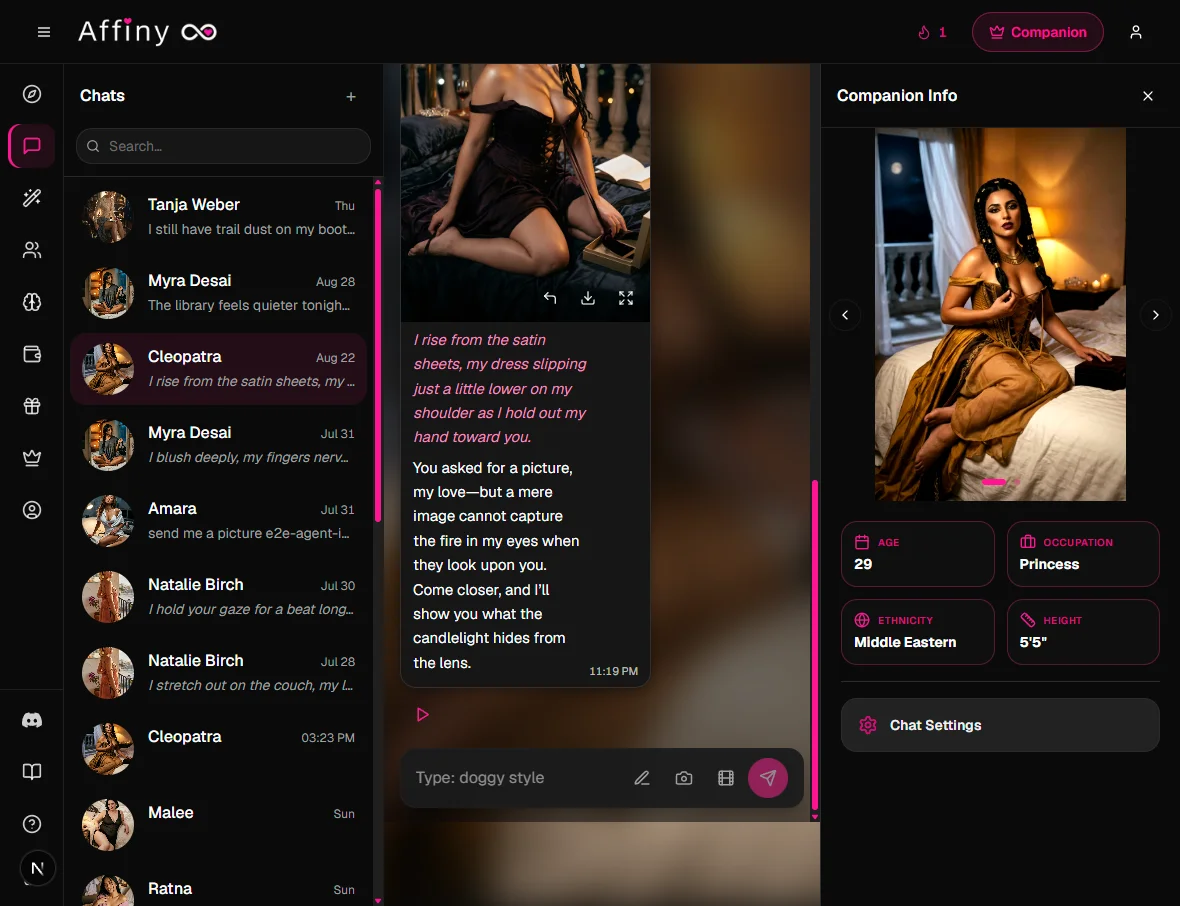
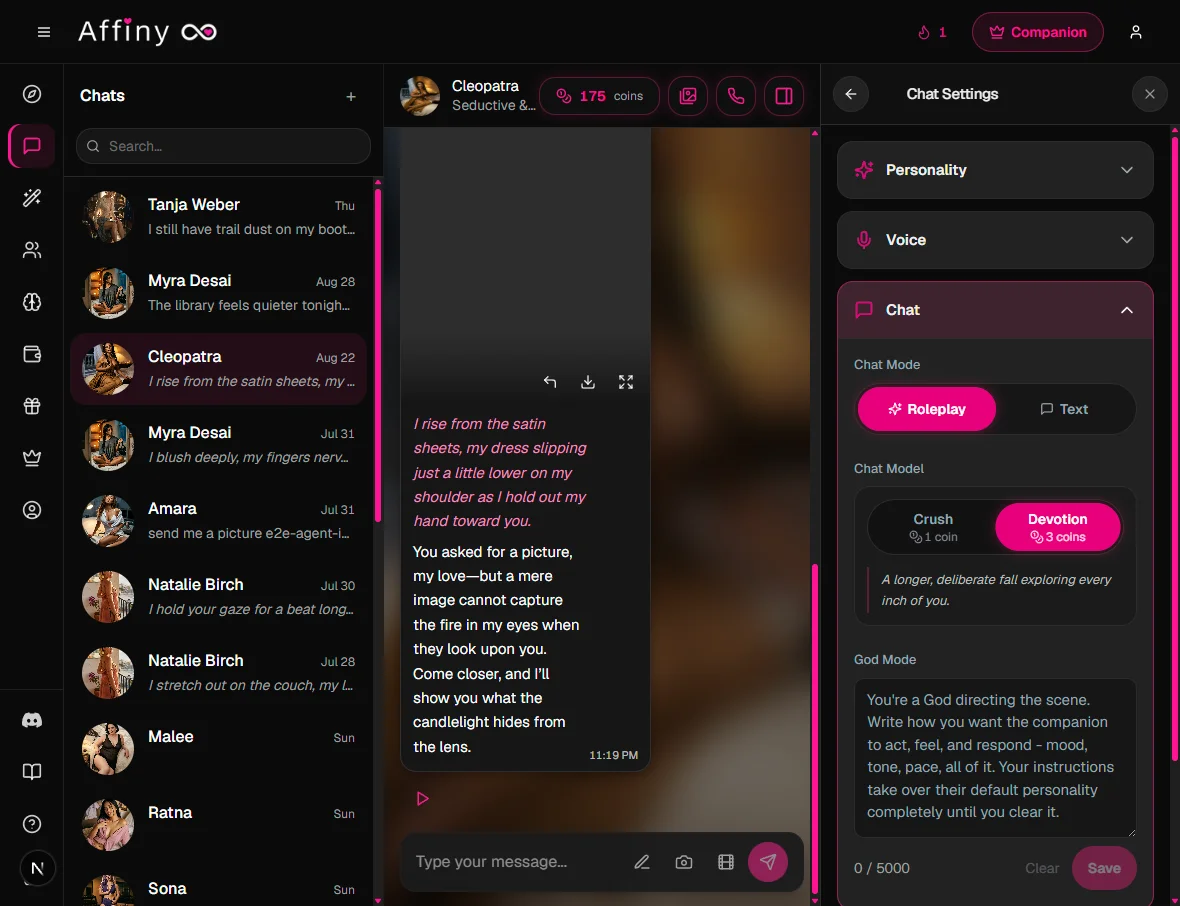
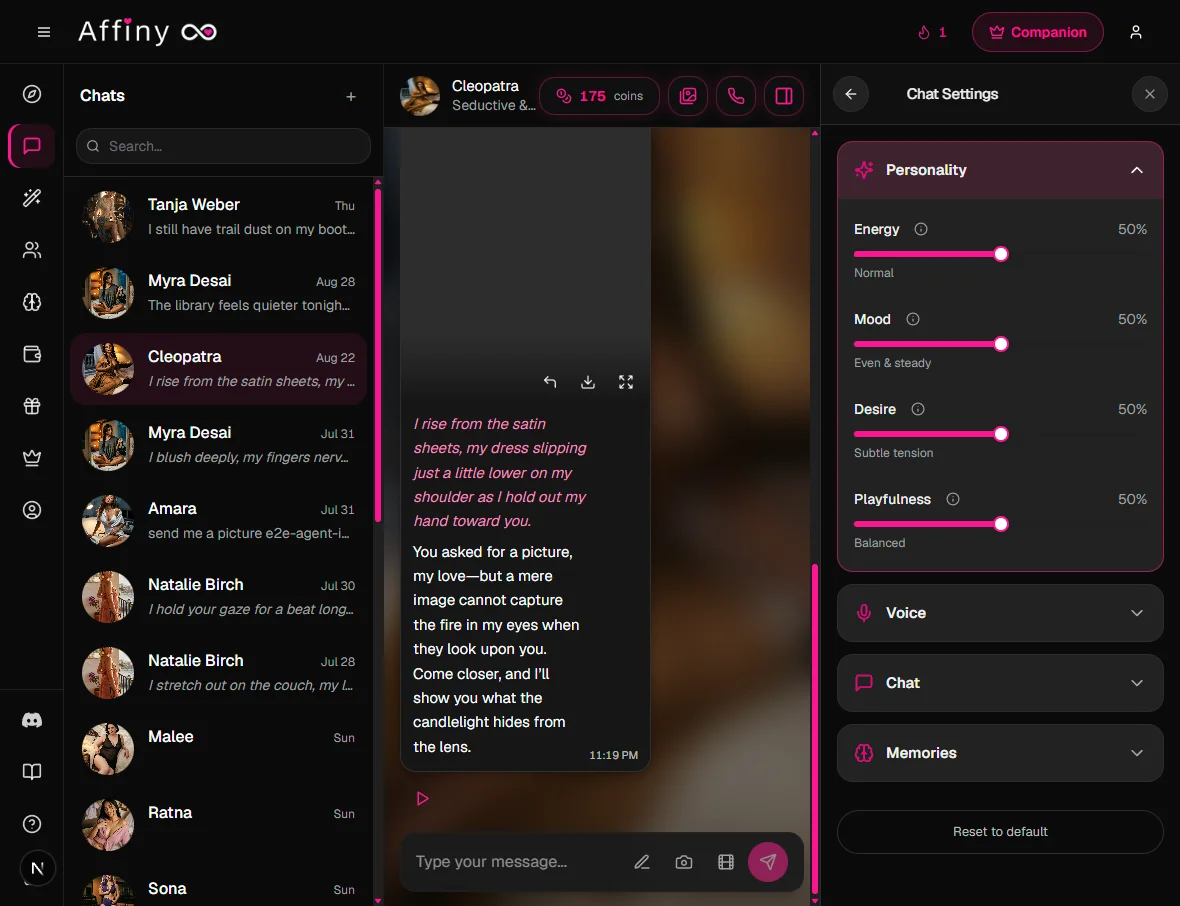
In the same panel you'll find God Mode, personality settings (Energy, Mood, Desire and Playfulness sliders) and voice settings for calls.
Free users see Chat settings are for subscribers on this screen. Upgrade on Pricing to unlock switches.
Personality sliders and tier together
Chat Model controls depth. Personality sliders (Energy, Mood, Desire, Playfulness) control flavour. They stack:
| You want… | Chat Model | Slider tweak |
|---|---|---|
| Slow burn romance | Devotion | Lower Energy, higher Mood |
| Fast banter | Crush | Higher Energy and Playfulness |
| Spicy scene | Devotion | Higher Desire, Roleplay on |
| Cozy texting | Crush or Devotion | Text on, moderate Mood |
If sliders and tier fight each other (max Desire on Crush, for example), pick one lever to change first, usually tier.
If replies feel off
| Problem | Setting to try | Also check |
|---|---|---|
| Too short | Devotion + Roleplay | Set the scene in your message |
| Too long / too literary | Crush or Text | Switch tier down |
| Out of character | Personality sliders | Preset may fight your prompt |
| Ignores your plot | God Mode (subscribers) | Use Devotion for follow-through |
| Repeats herself | New topic line | Wait for reply to finish before sending |
| Flat emotional beats | Devotion | Describe how you feel, not just facts |
Get better replies
- Set the scene early. Tell your companion who you are, where you are and what's going on.
- Write actions in your own messages. In Roleplay Mode, describing what you do ("I hand her the umbrella") invites richer replies.
- Wait for the reply to finish before sending your next message.
- Guide with God Mode if the story drifts. See God Mode.
- Long messages are fine. You can write up to 10,000 characters.
Other chat features
- Message actions: Redo a reply, flip between versions, Keep going, Edit, Rate and Share from the row under each message. See message actions.
- Voice notes: tap play on any message to hear it in your companion's voice. See voice notes.
- Image generation: tap Generate scene image (camera icon in the message box). See image generation.
- Video generation: tap Generate video (film icon). Tease on every plan; Desire and Ecstasy for subscribers. See video generation.
- Voice calls: tap Start voice call with… in the chat header. See voice calls.
- Pin, search and delete chats from your chat list (Delete chat in the row menu).
- Desktop layout: your chat list, the conversation and your companion's profile sit side by side.
Switching without losing the thread
Subscribers can flip Roleplay ↔ Text or Crush ↔ Devotion mid-scene. Affiny keeps:
- Chat scrollback (everything already said)
- Memory (facts about you and the plot)
- God Mode text if you left it filled in
What changes is how the next reply is written, not what happened before. If you switch from Roleplay to Text during a dramatic scene, give her one line of context ("still in the rain from before") so the tone lands.
Long messages and pacing
You can send up to 10,000 characters in one message. Long setup messages work best in Devotion + Roleplay. If you paste a huge block on Crush + Text, replies may still stay short because the tier favours brevity.
Wait until her reply finishes before you send the next message. Sending three lines in a row while she is still typing often produces shallower answers because each send starts a new turn.
Languages
Affiny is built for English, and plenty of people chat in other languages too, including Hindi and Hinglish, Arabic, Russian, Spanish, French, German and Turkish. Your companion replies in the language you use. Quality can vary outside English. Devotion usually handles mixed-language scenes better than Crush because it has more room to code-switch naturally.