


Voice calls let you talk to your companion out loud, and they answer in their own voice, live. It's a real conversation, not a recording read back to you. Free users can call too. They share the same memory as text chat, and you can replay lines as voice notes afterward.
Quick answer
Real-time voice calls with your companion, sharing one memory with chat. 30 a minute on free, 20 on a plan. Tap Start voice call in chat, allow the microphone, and speak. Free users can call from signup coins; subscribers unlock voice picking and style sliders.
Live two-way voice, not a read-back
Affiny AI voice is a live conversation: you speak, she answers in her voice in real time. Chat and calls share one memory layer, so a fact from text can surface on the next call. Voice notes (play any message) are separate and cost 1 free, free on a plan.
How to start a call
There are two ways: tap Start voice call with… at the top of the chat, or ask in chat and Affiny offers Start now.
Use the phone icon
- Open a chat with your companion.
- Tap Start voice call with… in the chat header.
- On the call screen, adjust tabs if you subscribe (see below).
- Tap Start Conversation and allow your microphone when your browser asks.
- Speak naturally. Tap Stop Conversation when you are done.
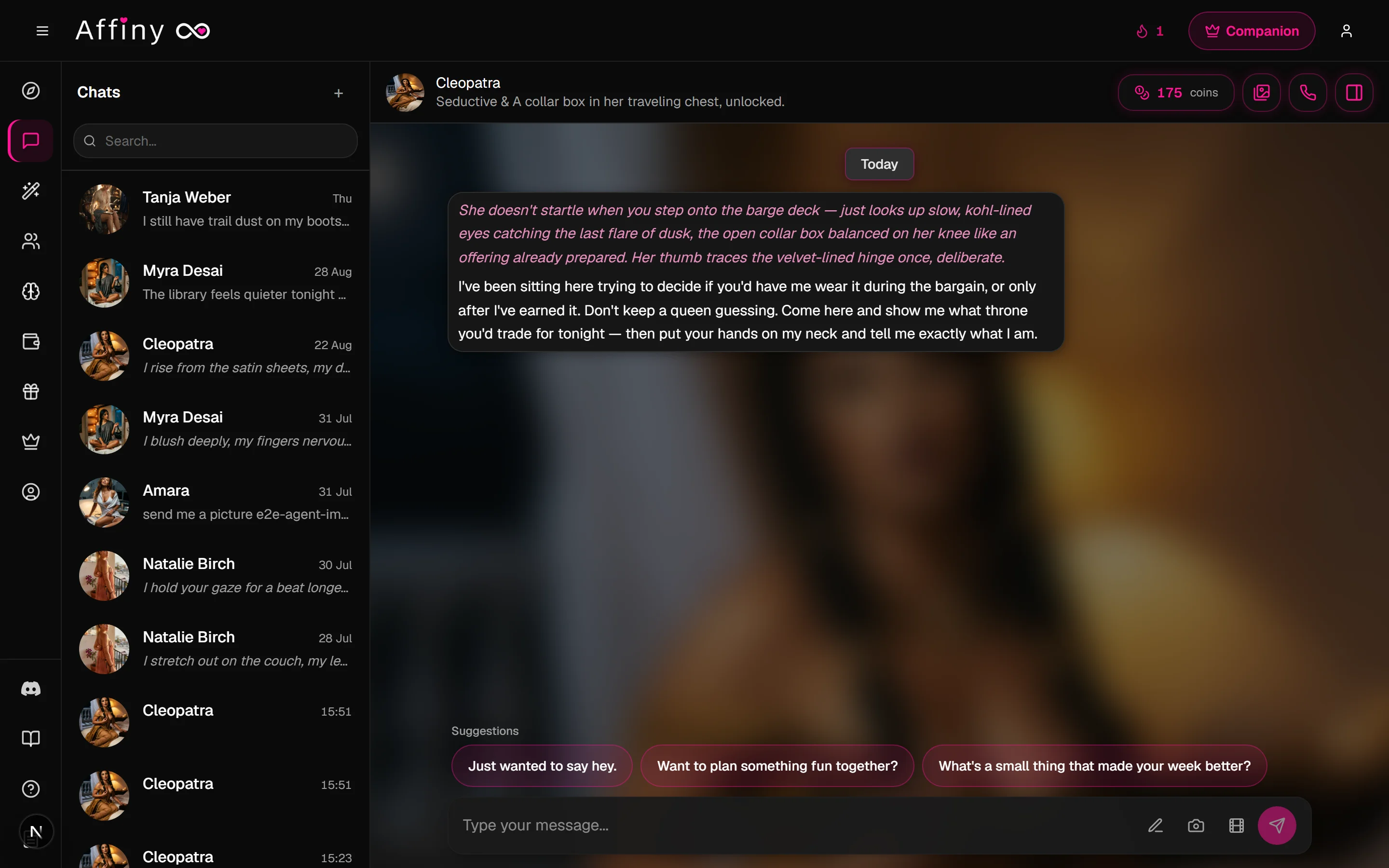
You can also tap Call Now on any companion's profile page.
Ask in chat instead
Type that you want to talk live. When Affiny reads it as a call request, a popup offers Start now before your message sends as regular chat.
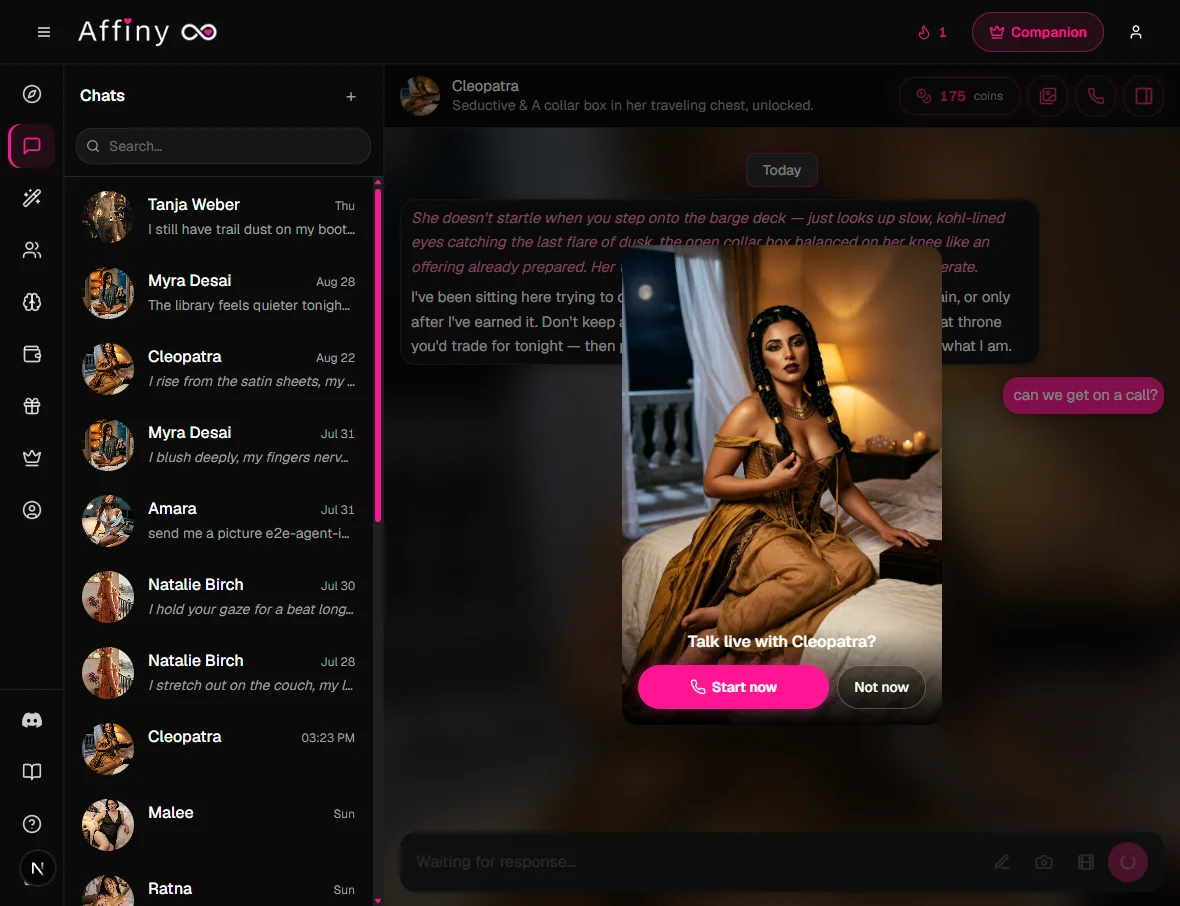
Call requests, live voice phrasing:
- "Can we get on a call?"
- "Voice call?"
- "Let's call"
- "Call me"
- "Can you call me?"
- "Ring me"
- "Talk with voice?"
These are examples, not a script. "I want to hear your voice" or "hop on a call with me" works too.
Won't trigger a call popup:
- Nickname lines like "call me daddy" or "what should I call you?"
- Future or offline phone talk ("I'll call you later", "give me your number")
- Voice notes ("send me a voice note"), that's the play button on messages, not a live call
- Saying you don't want a call ("don't call me")
Your companion greets you when the call connects, often by name.
What it costs
| Free plan | Subscribers | |
|---|---|---|
| Per minute | 30 | 20 |
| To start a call | At least 30 | At least 20 |
You pay for time on the call only. Connecting and waiting on the setup screen are never charged. Your 300 signup cover about 10 minutes at the free rate.
Worked examples
| Call length | Free plan (30/min) | Subscriber (20/min) |
|---|---|---|
| 5 minutes | 150 | 100 |
| 10 minutes | 300 (uses signup grant) | 200 |
| 30 minutes | 900 | 600 |
You need at least one minute of coins to start: 30 on free, 20 on a plan.
Allow your microphone
Most call problems are permission or noise, not Affiny itself.
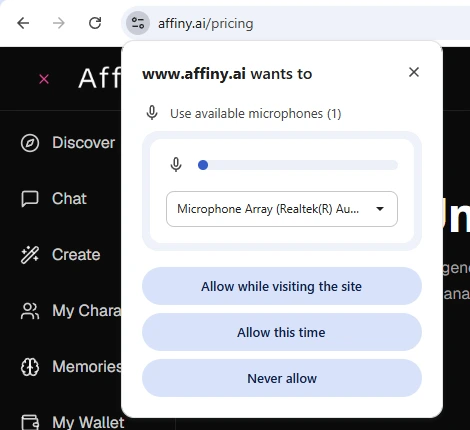
Desktop Chrome / Edge / Firefox
- Tap Start Conversation.
- When Chrome asks to use your microphone, choose Allow while visiting the site (or Allow this time). Avoid Never allow.
- If you previously blocked it, click the tune icon at the left of the address bar → Microphone → Allow for affiny.ai, then reload.
iPhone / iPad (Safari)
- iOS Settings → Safari → Microphone → Allow (or ask).
- Return to Affiny, start a call, tap Allow on the Safari prompt.
Android (Chrome)
- Tap the lock icon in the address bar → Permissions → Microphone → Allow.
- Disable battery savers that kill background tabs mid-call.
Use headphones in noisy rooms. Your companion pauses when the mic picks up background sound.
Your first 30 seconds (script)
Once connected, try this pattern:
- Greet: "Hey, it's me."
- Anchor context: "Pick up where we left off in chat" or "I had a rough day."
- One open question: "What would you say to me right now?"
- Pause after you speak. Wait for her full reply before talking again.
Short turns sound more natural than a monologue. She already has memory from text if you chatted earlier.
Memory works across calls and chat
Your companion has one memory of you for both chat and calls. Tell them about your day in text, then call later, and they'll know. Things you say on a call are remembered in chat too. See how memory works.
Before you start: four tabs on the call screen
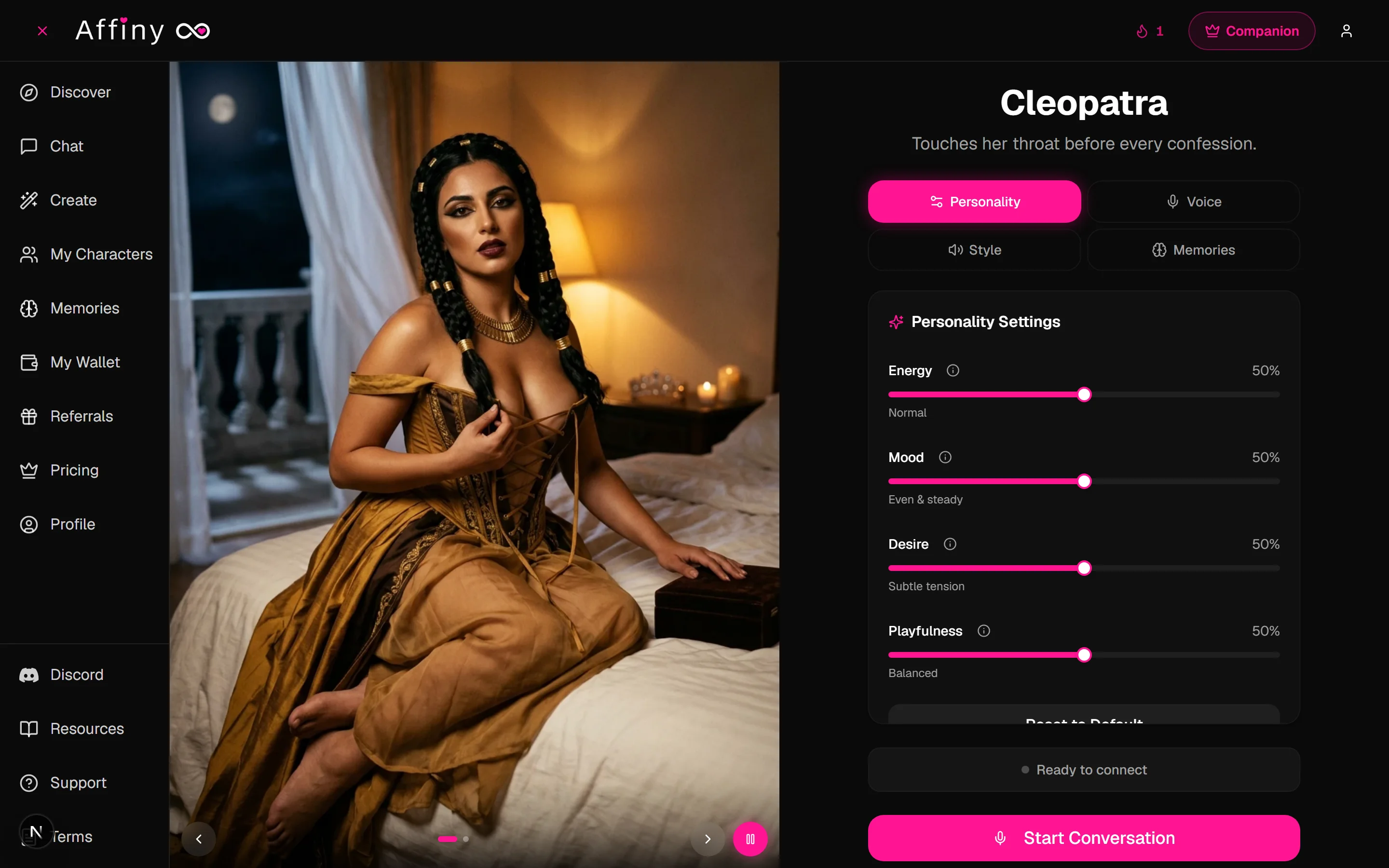
After you tap Start voice call with…, you land on the call screen, companion portrait on the left, controls on the right, and Start Conversation at the bottom. Set everything up here before you connect; once the call is live, the tabs tuck away and billing runs until you tap Stop Conversation.
Four tabs sit above the panel. Personality, Voice, and Style are subscriber features (free users call with defaults). Memories is visible to everyone so you can see what your companion already knows.
Personality
Shape how your companion acts on the call, the same four sliders as chat:
| Slider | What it does |
|---|---|
| Energy | Quiet, short replies vs lively and initiative-taking |
| Mood | Withdrawn and low vs warm, happy, and open |
| Desire | Platonic closeness vs flirty and explicit at the high end |
| Playfulness | Serious and deep vs teasing and chaotic |
Tap the info icon on any slider for a longer hint. Use Reset to Default to snap all four back to the middle.
Voice
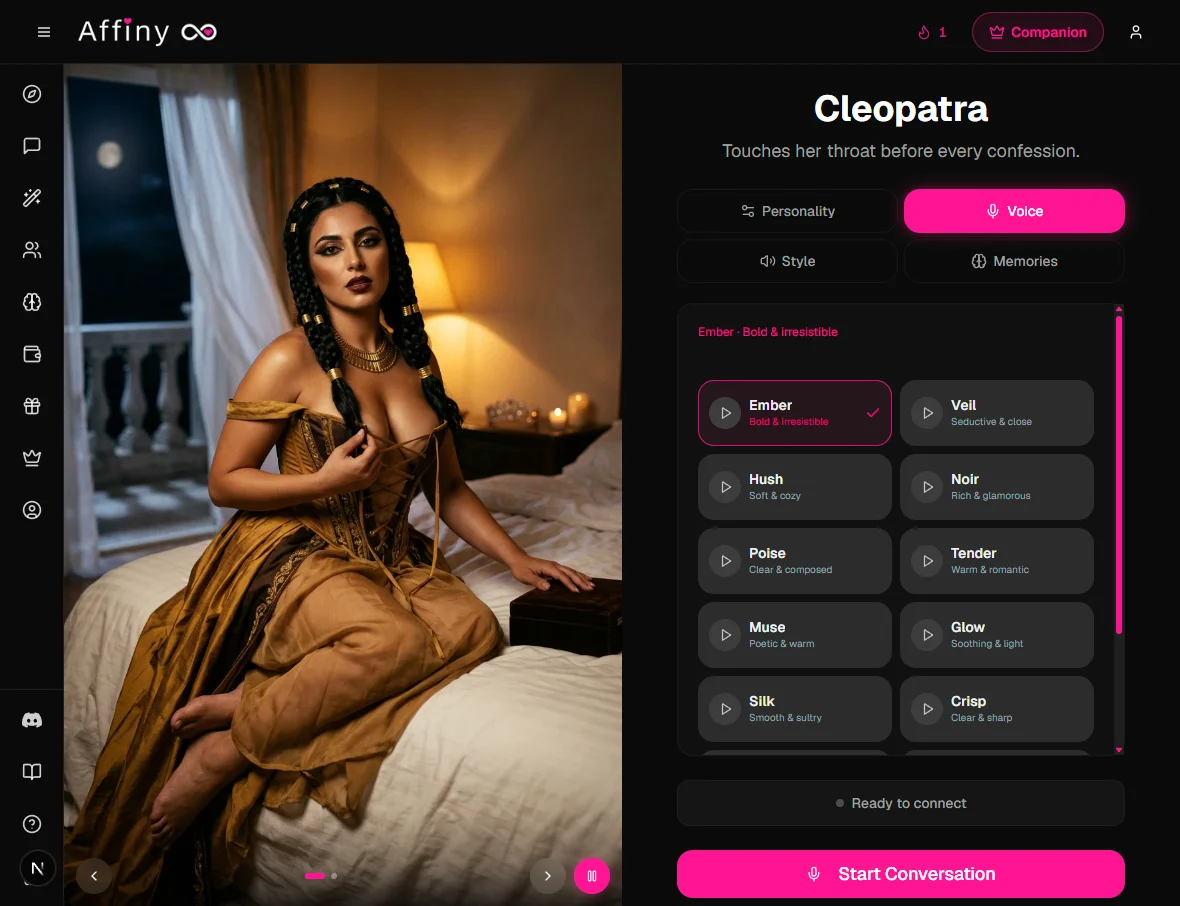
Pick who speaks. Subscribers get a grid of voices matched to your companion's gender, names like Ember, Veil, Hush, Noir, each with a short descriptor (e.g. "Bold & irresistible", "Soft & cozy").
- Tap a voice row to select it (pink checkmark).
- Tap the play button on any row to hear a preview before you commit, no coins spent on previews.
- Your choice applies to the whole live call once you tap Start Conversation.
Style
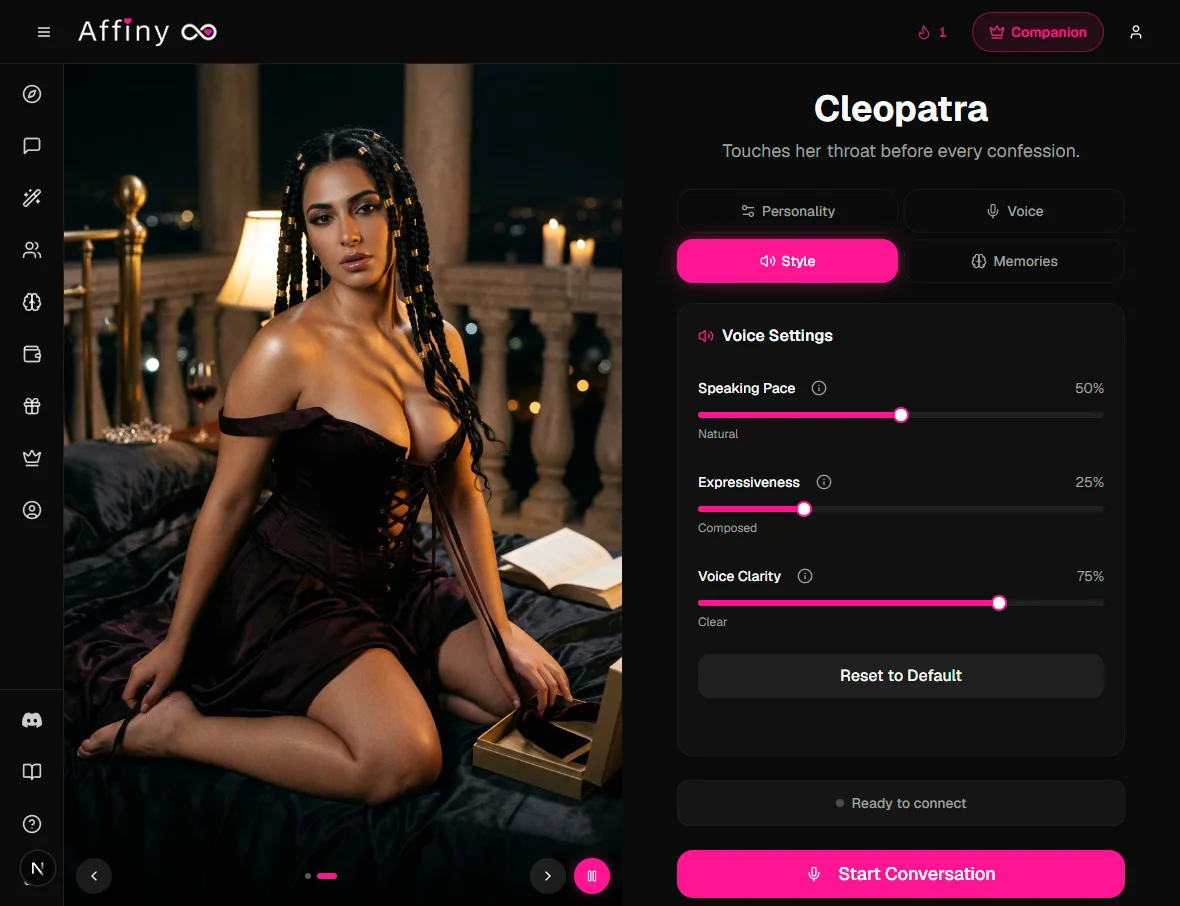
Fine-tune how the selected voice sounds:
| Slider | What it does |
|---|---|
| Speaking Pace | Slow and deliberate → fast and energetic |
| Expressiveness | Calm and steady → very dramatic |
| Voice Clarity | Soft and smooth → ultra crisp |
Each slider shows a plain-language label under it (Natural, Composed, Clear, and so on). Reset to Default restores the out-of-the-box mix.
Memories
Everyone can browse what this companion remembers before you call. Subscribers can also add, edit, or delete memories from this tab. Same data as chat and the Memories page, it carries into the call automatically.
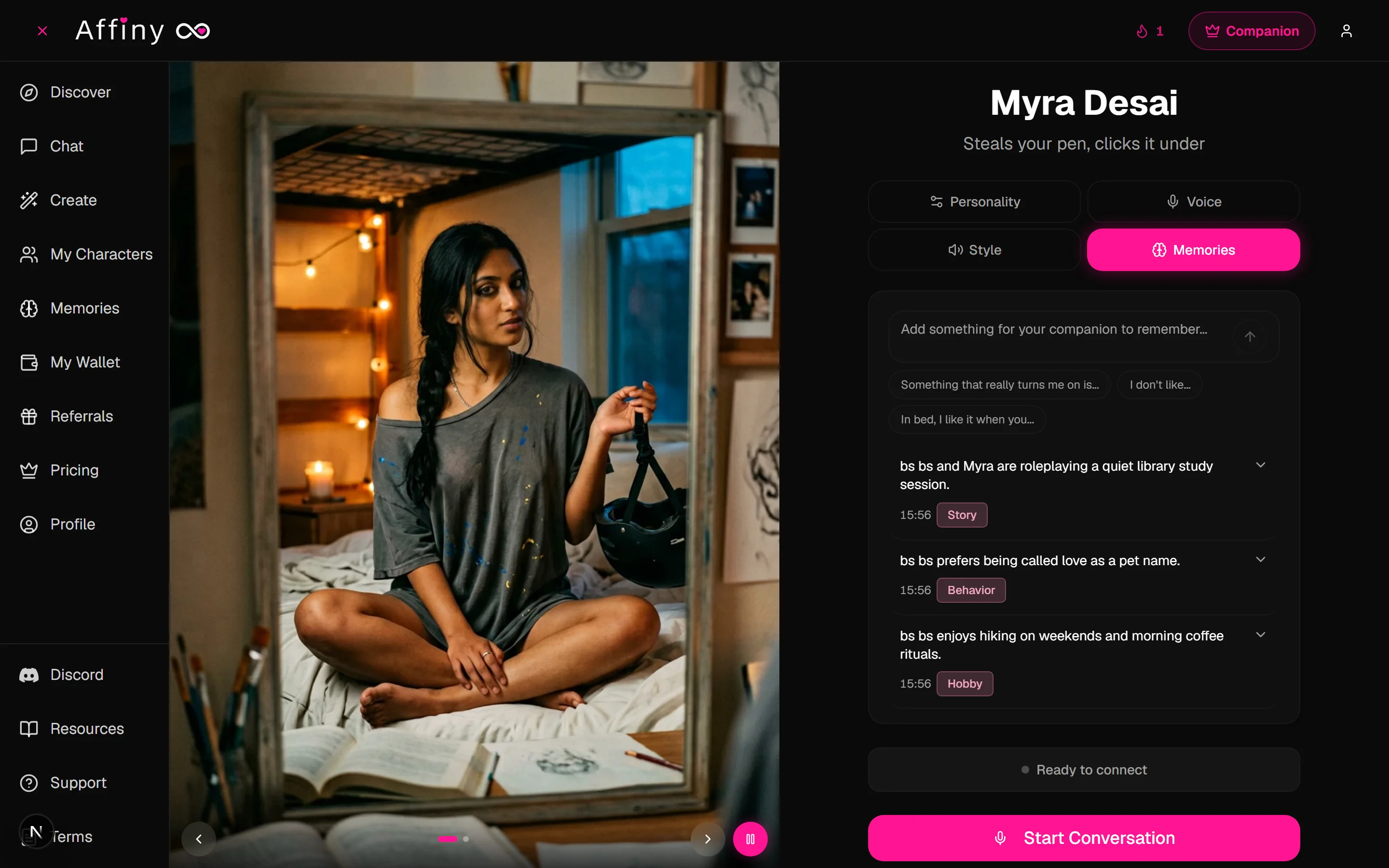
When you are happy with your picks, tap Start Conversation, allow the microphone, and speak. Subscribers see a compact summary of personality, voice, and style at the top of the screen for the rest of the call.
Voice notes: hear any message
Don't want a full call? Tap the play button on any message to hear it in your companion's voice. Voice notes cost 1 on the free plan and are free for subscribers.
For the best call
- Find a quiet spot or use headphones. Your companion pauses when it hears background noise, so a noisy room can make them go quiet.
- Use a current browser. The latest Chrome, Safari, Edge or Firefox work best.
- Keep the page open. Refreshing or closing the page ends the call. You can start a new one any time.
- Speak naturally. Pause when you're done and your companion will answer.
Languages
Affiny is built for English. Many people also call in other languages, including Hindi, Hinglish, Arabic, Spanish and French, and your companion answers in your language. Quality can vary outside English, so give it a try.
Something not working?
| What you see | Likely cause | What to try |
|---|---|---|
| She never responds | Mic blocked or room noise | Allow microphone; use headphones; quieter room |
| I can't hear her | Volume, tab muted, or Bluetooth routing | Check phone volume; tap page once; pick correct output device |
| Call ended suddenly | Refresh, tab closed, or lost network | Start a new call from chat |
| Call ended early | Coins ran out | Check My Wallet; subscribe for 20/min or top up |
| Echo or feedback | Speaker + mic open | Use headphones |
| Wrong language | You mixed languages | Speak one language clearly; she follows your lead |
| Setup tabs missing | Call already live | Stop Conversation, adjust on setup screen, start again |
Still stuck? See troubleshooting or contact support and choose Voice Call Issues.