


Most AI chats forget you the moment you close them. Affiny companions don't. They remember your name, your job, your plans, what you like, and the story you've built together, across chats and calls.
Quick answer
Memory is per companion and shared between chat and voice. Affiny saves the details that matter from your conversations and brings them up naturally later. Viewing memories is free for everyone. Adding, editing and deleting memories is for Companion and Intimate subscribers. God Mode directions are private and never saved as memories.
What your companion remembers
Memory is not a transcript. Affiny extracts the facts and moments that shape how your companion talks to you.
| Kind | Example she might recall later |
|---|---|
| Personal | Your name, job, city, daily routine |
| Life | A job interview this week, your roommate's name |
| Relationship | That you are dating, how you met, your dynamic |
| Affection | Pet names, goodnight texts, little rituals |
| Emotional | That work has been stressful lately |
| Story | Where you left off in a roleplay plot |
| Preference, Kink, Boundary | What you like, what you don't, limits you set |
| Behavior, Communication | How direct you want her to be, tone you prefer |
| Appearance, Media | Hair colour you asked for in images |
| Hobby, Continuity, Feedback | Your interests, scene you paused, what worked in chat |
She weaves these into replies ("How did the interview go?"), not as a list read back to you.
What she won't remember
Some things never become memories:
- God Mode directions (private scene notes, not stored on the Memories page)
- One-off throwaway lines you never repeat
- Operational safety signals (filtered before you ever see them)
- Details you delete (subscribers can remove a memory permanently)
If something important didn't stick, say it plainly again or add it manually.
Memory in action
Monday, in chat: "I have a big presentation on Thursday. I'm nervous."
Thursday, in a voice call: She opens with "Before your presentation, want to run through your opening line?" She connected a fact from chat to the call without you prompting her.
That is what shared memory feels like when it is working.
One memory for chat and calls
Memory is shared between text and voice for the same companion. Tell her something in chat and she'll know it on your next call, and the other way round.
Each companion has their own memory of you. What you tell one companion stays with them.
Viewing memories (free)
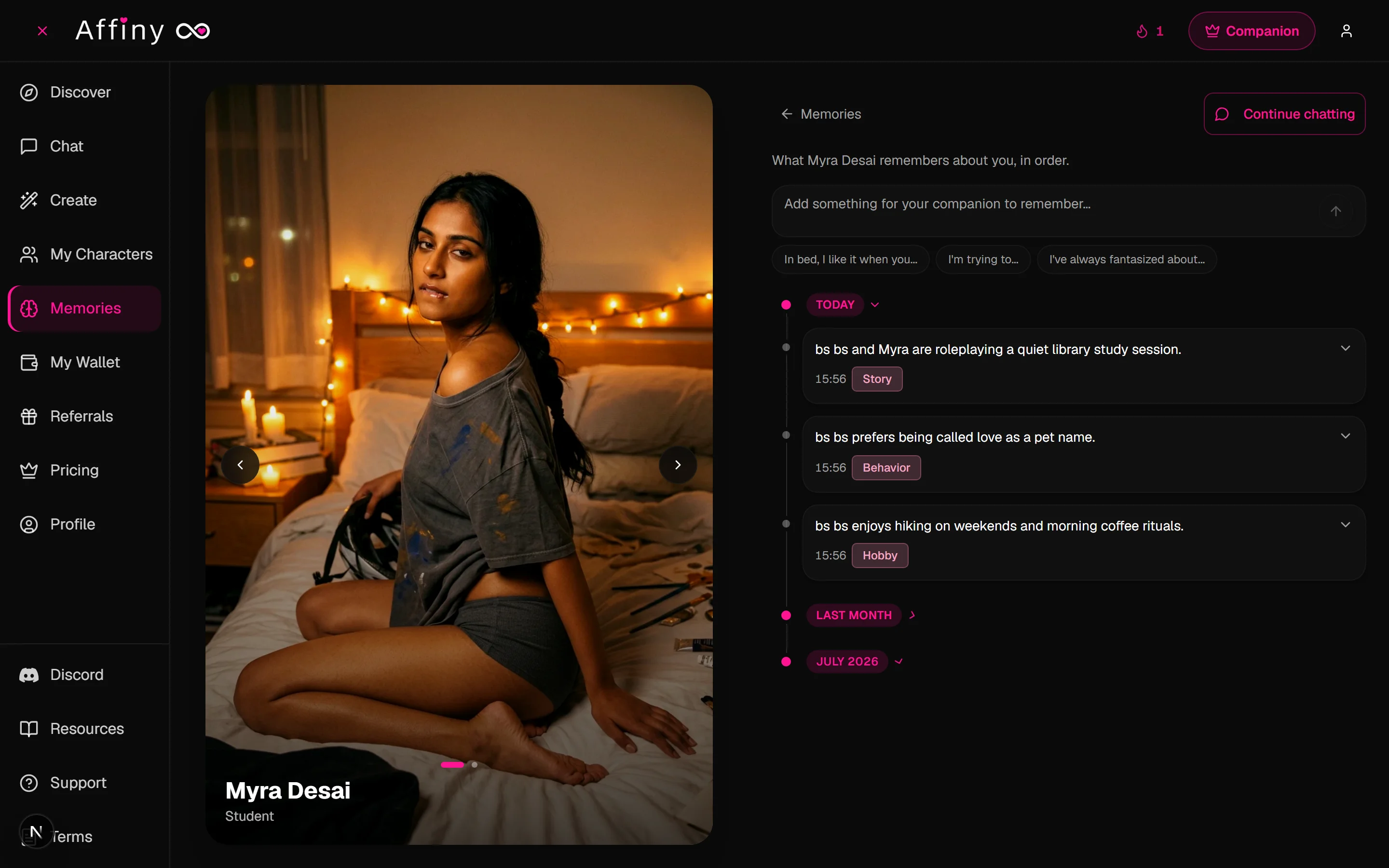
- Open Memories in the sidebar.
- Pick a companion from the grid.
- Scroll the timeline. Each entry shows a category label (Personal, Story, Boundary, and so on) and the text Affiny saved.

Free accounts see the most recent memories for each companion. Subscribers see the full history.
Adding, editing and deleting (subscribers)
Subscribers can fix wrong details, remove something you'd rather she forgot, or add a memory yourself.
- Open Memories and pick a companion.
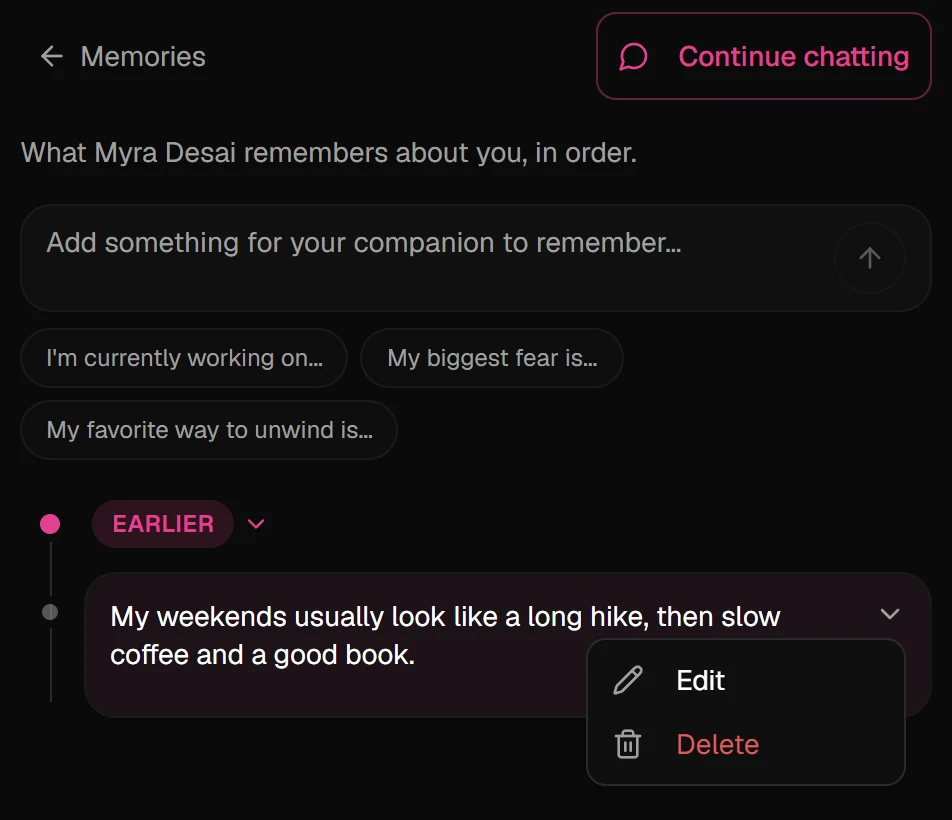
- To add one, type in Add something for your companion to remember… at the top, or tap a starter such as My favorite way to unwind is…, and send.
- To edit, click the arrow on the right of a memory (on phone, press and hold the memory), choose Edit, change the text and save.
- To delete, open the same menu, choose Delete, then confirm Delete this memory?
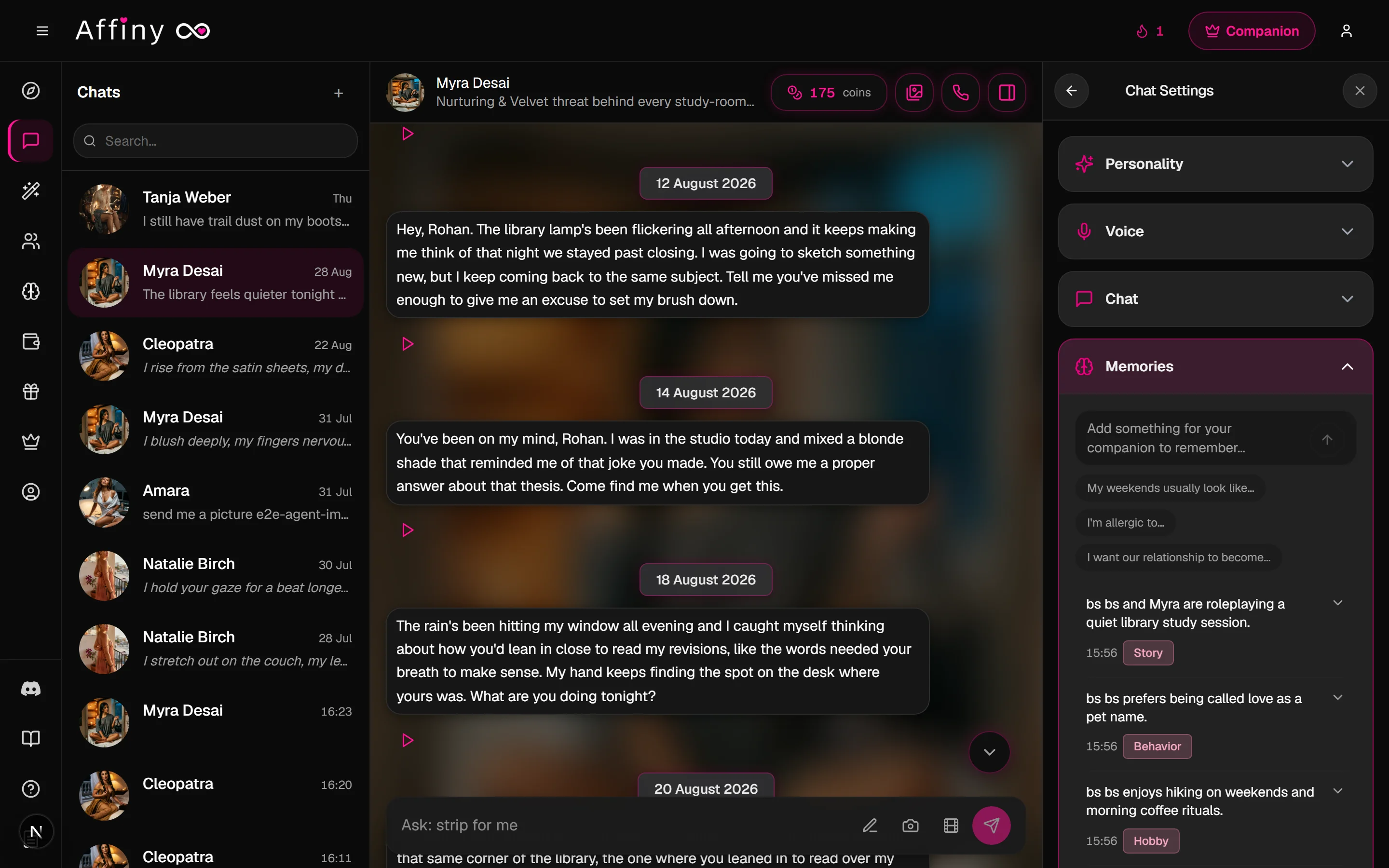
You can also jump to memories from chat: open the Companion Panel (panel icon in the chat header) → Chat Settings → Memories.
Memory categories
Each memory shows one or more category labels. These match what you see on the Memories page:
| Label | Usually covers |
|---|---|
| Personal | Name, job, where you live |
| Life | Current events and context |
| Relationship | How the two of you relate |
| Affection | Pet names, rituals, sweet moments |
| Emotional | Mood and wellbeing |
| Story | Roleplay plots and scenes |
| Preference | Likes and turn-ons |
| Kink | Specific kinks you have named |
| Boundary | Limits and hard nos |
| Behavior | How you want her to act |
| Communication | Tone and style you prefer |
| Appearance | Looks and visual details |
| Media | Image and video requests |
| Hobby | Interests and pastimes |
| Continuity | Where a storyline paused |
| Feedback | What you said worked or didn't |
Free vs subscriber memory
| Free | Subscribers | |
|---|---|---|
| Cross-session memory in chat and calls | ✓ | ✓ |
| View memories | Most recent | Full history |
| Recall in replies | Standard | Sharper, more up to date |
| Add, edit and delete memories | No | ✓ |
Help your companion remember
Memory works best when you treat important facts like things you'd tell a partner you'd see again, not like secrets you mention once in passing.
- Say it plainly. "Call me Alex" or "My favourite colour is blue" sticks better than a passing hint buried in roleplay.
- Mention important things more than once, especially early in a new chat. Repeating your city, job title or boundary in the first few sessions helps it land.
- Correct them in the moment. "Actually, I moved to Pune last month" updates what they know. Subscribers can also edit the old memory so it does not fight the correction.
- Add it yourself on the Memories page if you're a subscriber. Good candidates: your real name, timezone, anniversary, hard limits, or a plot summary you do not want to retype.
- Use Devotion on a plan for longer, more detail-aware replies that pick up subtler cues.
- Keep God Mode for scenes, not facts. Directions like "we are in a hotel room" steer the next reply; they are not stored as long-term memory. Put durable facts on the Memories page instead.
What to save manually (subscriber checklist)
| Worth adding | Usually not worth adding |
|---|---|
| Your name and pronouns | A joke you made once |
| Partner status and pet names | Throwaway small talk |
| Hard boundaries | God Mode scene notes |
| Ongoing plot chapter | Exact wording of one message |
| Medical or schedule facts you want her to ask about | Temporary mood that will change tomorrow |
If it's not working
| What you see | Likely cause | What to try |
|---|---|---|
| She got a fact wrong | Old or vague memory | Edit or delete the entry (subscribers), then tell her the correct version in chat |
| She forgot something important | Never repeated or too buried | Say it plainly again, or add it manually on Memories |
| Memories page is empty | New account or few chats yet | Chat more; memories build from real conversation |
| Another companion "knows" it | Memories don't cross companions | Tell the other companion directly, or add a memory for them |
| She ignores a God Mode note | God Mode is not memory | Use God Mode for scene direction; use Memories for facts about you |
Memory vs chat history
Your chat scrollback is the full transcript. Memory is the distilled facts Affiny keeps for recall later.
| Chat history | Memory | |
|---|---|---|
| What it is | Every message you sent and received | Short facts and moments worth keeping |
| Where you see it | In the chat thread | On Memories |
| Free vs paid | Full thread for your account | Free: recent memories. Subscribers: full list + edit |
| God Mode | Not stored as memory | Never |
If she "forgot" something you said fifty messages ago, it may still be in the scrollback but not in memory yet. Repeat the fact or add it manually.
Voice calls and memory
Because chat and calls share memory, you can:
- Tell her your schedule in text and ask about it on a voice call the same day.
- Mention a boundary on a call and see it respected in the next chat.
- Build a roleplay plot in voice, then continue in text without re-explaining.
Voice does not get a separate memory file. One companion, one memory timeline.
Privacy
Your memories are private to your account. No one at Affiny reads your chats or listens to your calls. See privacy and safety for the full picture.